


TheBB
-
Постов
2 552 -
Зарегистрирован
-
Посещение
-
Победитель дней
54
Тип контента
Профили
Форумы
Галерея
Загрузки
Блоги
События
Весь контент TheBB
-
 usage: script:
-
Ответ был дан - https://forum.keenetic.com/topic/16479-outline-клиент-shadowsocks/?do=findComment&comment=185625 С восприятием прочитанного у пользователей большие проблемы ("жертвы ЕГЭ"?), тема закрывается. За создание новых/аналогичных тем - вечный бан!
- 50 ответов
-
- 16
-

-

-

-
`opkg install libopenssl-legacy` ?
-
`opkg update` ?
-
Поторопились. Синхронизация ещё не закончена. pcre - https://github.com/openwrt/packages/commit/38d5b8b3444ab83348a35adec145443d755aae45 => https://github.com/Entware/entware-oldpackages-ports/commit/81dfc9a93fd030e826caab53ec7b11ddd1c5db05
- 2 ответа
-
- 1
-

-
https://www.debian.org/News/2024/2024062902 https://www.debian.org/News/2024/20240629
-
Дублирование записей. Исправьте (удалите лишние записи) в файле "/opt/etc/opkg.conf". Удалите всё в "/opt/var/opkg-lists" (`rm /opt/var/opkg-list/*`) и обновите списки пакетов (`opkg update`).
-
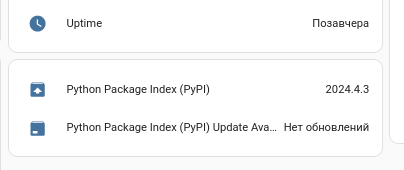
Ну, что, дамы и господа, будем ждать owrt`шников или займёмся экстримом? ~ # ~ # python --version Python 3.12.2 ~ # hass --version 2024.4.3 ~ # Не ищите - не выложено.
-
Тут можно меня смело пинать и дать в глаз... подготовил, но пропустил-забыл. Если не критично - можно подождать до следующей синхронизации. Или? Будет так: ~ # file Example1.png Example1.png: PNG image data, 1337 x 1067, 8-bit/color RGB, non-interlaced ~ # ~ # php fileinfo.php; echo image/png ~ #
-
KN-2710 в режиме extender-ретранслятор (как и ZKU2 выше) ~ # ndmc -c show rc ppe config, name = ppe: engine: hardware ~ # ~ # ndmc -c show rc ppe config, name = ppe: no: enabled: no engine: hardware ~ #
-
на всякий случай - из ZyXEL Keenetic Ultra II ~ # ndmc -c show rc ppe config, name = ppe: engine: hardware ~ # ~ # ndmc -c show rc ppe config, name = ppe: no: enabled: no engine: hardware ~ #
-
KN-2110: root@Keenetic_Duo:~# ndmc -c show version | grep -E '(release|title)' release: 4.02.A.3.0-0 title: 4.2 Alpha 3 root@Keenetic_Duo:~# disabled root@Keenetic_Duo:~# root@Keenetic_Duo:~# curl -s localhost:79/rci/show/rc/ppe [ { "engine": "software" }, { "enabled": false, "engine": "hardware" } root@Keenetic_Duo:~# ndmc -c show rc ppe | grep -B1 hard | grep enabled enabled: no root@Keenetic_Duo:~# root@Keenetic_Duo:~# if [ -z "$(ndmc -c show rc ppe | grep -B1 hard | grep enabled)" ]; then echo "hardware enabled"; else echo "hardware disabled"; fi hardware disabled root@Keenetic_Duo:~# enabled root@Keenetic_Duo:~# root@Keenetic_Duo:~# curl -s localhost:79/rci/show/rc/ppe [ { "engine": "software" }, { "engine": "hardware" } ]root@Keenetic_Duo:~# root@Keenetic_Duo:~# ndmc -c show rc ppe | grep -B1 hard | grep enabled root@Keenetic_Duo:~# root@Keenetic_Duo:~# if [ -z "$(ndmc -c show rc ppe | grep -B1 hard | grep enabled)" ]; then echo "hardware enabled"; else echo "hardware disabled"; fi hardware enabled root@Keenetic_Duo:~#
-
на встроенной не тестировал (кажись, не помню) запустить `ldconfig` для обновления кеша библиотек.
-
Надо owrt`шникам "в глаз плюнуть", версии обновляют, а за содержимым не следят. https://github.com/openwrt/packages/blob/master/utils/mariadb/Makefile#L464-L467 --- собрано ➜ ls -l *check* | cut -d' ' -f-2,4- -rwxr-xr-x 1 3620128 фев 23 11:32 innochecksum -rwxr-xr-x 1 3861704 фев 23 11:32 mariadb-check lrwxrwxrwx 1 13 фев 23 11:36 mysqlcheck -> mariadb-check упаковано ➜ ls -l *check* | cut -d' ' -f-2,4- lrwxrwxrwx 1 10 фев 23 11:36 mariadbcheck -> mysqlcheck -rwxr-xr-x 1 3730088 фев 23 11:36 mysqlcheck
-
Не оно? ~ # opkg list | grep zigpy python3-bellows - 0.38.1-1 - bellows is a Python 3 library implementation for the zigpy project to add Zigbee radio support for Silicon Labs EM35x ("Ember") and EFR32 ("Mighty Gecko") based Zigbee coordinator devices using the EZSP (EmberZNet Serial Protocol) interface. python3-zigpy - 0.63.4-1 - zigpy is a hardware independent Zigbee protocol stack integration project to implement Zigbee standard specifications as a Python 3 library. python3-zigpy-deconz - 0.23.1-1 - zigpy-deconz is a Python 3 implementation for the Zigpy project to implement deCONZ based Zigbee radio devices. python3-zigpy-xbee - 0.20.1-1 - zigpy-xbee is a Python implementation for the Zigpy project to implement XBee based Zigbee radio devices from Digi. python3-zigpy-zigate - 0.12.0-1 - zigpy-zigate is a Python 3 implementation for the Zigpy project to implement ZiGate based Zigbee radio devices. python3-zigpy-znp - 0.12.1-1 - zigpy-znp is a Python library that adds support for common Texas Instruments ZNP (Zigbee Network Processors) Zigbee radio modules to zigpy, a Python Zigbee stack project. ~ # или метапак ha-component-zha - 2024.3.1-1 - Zigbee Home Automation
-
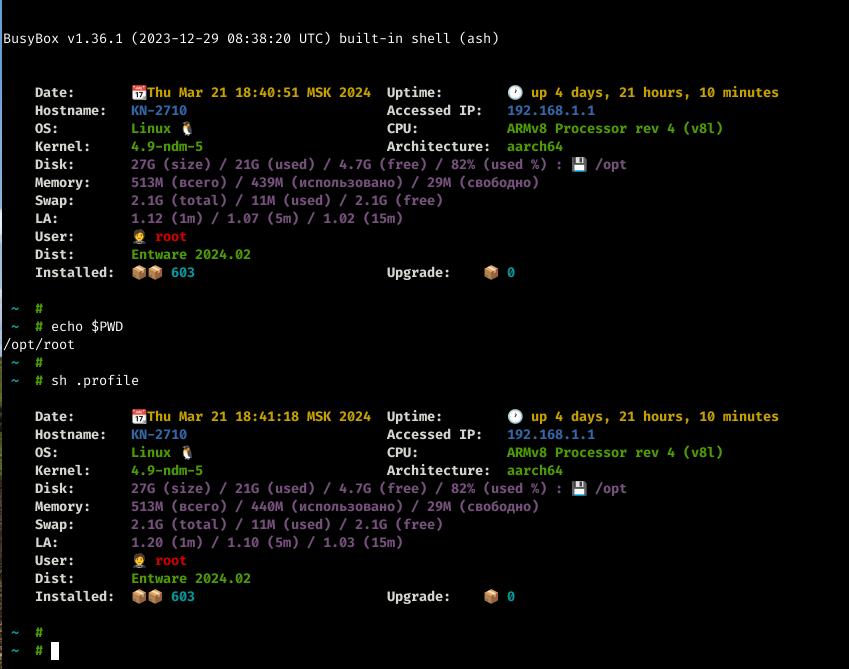
из телеги https://t.me/entware установить пакеты: `opkg install coreutils-df procps-ng-free procps-ng-uptime` править по вкусу (удалить, добавить, изменить вывод)
-
Пакеты собраны для изучения процесса сборки (кросс-компиляции) проектов, написанных на языке программирования Rust, на официально не поддерживаемых архитектурах, и тестирования в различных конфигурациях. Для тестирования нужно установить пакет aarch64 - `opkg install http://bin.entware.net/aarch64-k3.10/test/arti_1.2.0-1_aarch64-3.10.ipk` mips - `opkg install http://bin.entware.net/mipssf-k3.4/test/arti_1.2.0-1_mips-3.4.ipk` mipsel - `opkg install http://bin.entware.net/mipselsf-k3.4/test/arti_1.2.0-1_mipsel-3.4.ipk` и настроить кофиг, активировав действующие мосты (bridges) (самостоятельно) и др. параметры, напр., для запуска от root`a - allow_running_as_root = true или указать путь к каталогу кэша - cache_dir = "/opt/var/cache/arti" Для того, чтобы вывести требуемые параметры запуска, необходимо запустить с ключом "help", или "-h", или "--help" (последние две также и для подпрограмм). Пример запуска (после настройки) root@Keenetic_Duo:~# root@Keenetic_Duo:~# arti proxy -c /opt/etc/arti/arti-config.toml 2024-04-02T10:20:08Z INFO arti: Starting Arti 1.2.0 in SOCKS proxy mode on localhost port 9150 ... 2024-04-02T10:20:08Z INFO arti_client::client: Using keystore from "/opt/var/lib/arti/keystore" 2024-04-02T10:20:35Z INFO tor_dirmgr: Marked consensus usable. 2024-04-02T10:20:37Z INFO tor_dirmgr: Loaded a good directory from cache. 2024-04-02T10:20:37Z INFO arti: Sufficiently bootstrapped; system SOCKS now functional. 2024-04-02T10:20:37Z INFO arti::socks: Listening on [::1]:9150. 2024-04-02T10:20:37Z INFO arti::socks: Listening on 127.0.0.1:9150. 2024-04-02T10:20:40Z INFO tor_guardmgr::guard: We have found that guard [185.x.x.x:9001+ ed25519:Bf…] is usable. 2024-04-02T10:20:42Z INFO tor_guardmgr::guard: We have found that guard [5.x.x.x:143 ed25519:ty…] is usable. 2024-04-02T10:20:43Z INFO tor_dirmgr: Marked consensus usable. 2024-04-02T10:20:44Z INFO tor_dirmgr: Directory is complete. attempt=1 ... или запуск в фоне root@Keenetic_Duo:~# root@Keenetic_Duo:~# arti proxy -c /opt/etc/arti/arti-config.toml > /dev/null 2>&1 & root@Keenetic_Duo:~# или написать стартовый скрипт. Пример проверки (с интервалом 5-10 минут) root@Keenetic_Duo:~# root@Keenetic_Duo:~# curl -x socks5h://127.0.0.1:9150 -s https://check.torproject.org/api/ip; echo root@Keenetic_Duo:~# curl -x socks5h://127.0.0.1:9150 -s https://check.torproject.org/api/ip; echo {"IsTor":true,"IP":"171.25.193.80"} root@Keenetic_Duo:~# root@Keenetic_Duo:~# curl -x socks5h://127.0.0.1:9150 -s https://check.torproject.org/api/ip; echo {"IsTor":true,"IP":"171.25.193.80"} root@Keenetic_Duo:~# root@Keenetic_Duo:~# curl -x socks5h://127.0.0.1:9150 -s https://check.torproject.org/api/ip; echo {"IsTor":true,"IP":"109.70.100.70"} root@Keenetic_Duo:~# root@Keenetic_Duo:~# curl -x socks5h://127.0.0.1:9150 -s https://check.torproject.org/api/ip; echo {"IsTor":true,"IP":"192.42.116.220"} root@Keenetic_Duo:~#
-
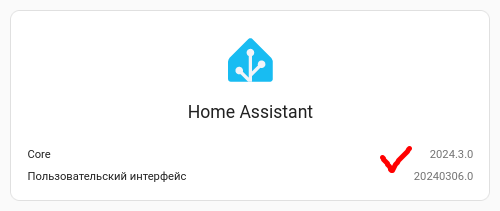
bump to 2024.3.0
-
python3-fnvhash использовался как пример, применимо и для других пакетов. Видимо, что-то не обновилось.
-
Пакет python-fnvhash (как и нек-рые другие) завезли в OpenWrt, у него PKG_RELEASE:=1 Удалить пакет и установить снова: opkg remove python3-fnvhash --force-depends opkg install python3-fnvhash В "тяжелых" случаях, когда запись о пакете осталась в /opt/lib/opkg/status, а сам пакет уже удалён: root@Keenetic-6065: /opt/root $ root@Keenetic-6065: /opt/root $ opkg install python3-fnvhash --force-reinstall Removing package python3-fnvhash from root... Installing python3-fnvhash (0.1.0-3) to root... Collected errors: * opkg_download_pkg: Package python3-fnvhash is not available from any configured src. * opkg_install_pkg: Failed to download python3-fnvhash. Perhaps you need to run 'opkg update'? * opkg_install_cmd: Cannot install package python3-fnvhash. root@Keenetic-6065: /opt/root $ найти и удалить полностью запись (от пустой строки до пустой) Package: python3-fnvhash Version: 0.1.0-3 Depends: libc, libssp, librt, libpthread, python3-light Status: install user installed Architecture: mipsel-3.4 Installed-Time: 1709053150 ^ установить пакет root@Keenetic-6065: /opt/root $ root@Keenetic-6065: /opt/root $ opkg install python3-fnvhash Installing python3-fnvhash (0.1.0-1) to root... Downloading http://bin.entware.net/mipselsf-k3.4/test/HA/python3-fnvhash_0.1.0-1_mipsel-3.4.ipk Configuring python3-fnvhash. root@Keenetic-6065: /opt/root $ или изменить версию было Package: python3-fnvhash Version: 0.1.0-3 стало Package: python3-fnvhash Version: 0.0.0.0-0000 ^ установит пакет root@Keenetic-6065: /opt/root $ root@Keenetic-6065: /opt/root $ opkg install python3-fnvhash Upgrading python3-fnvhash on root from 0.0.0.0-0000 to 0.1.0-1... Downloading http://bin.entware.net/mipselsf-k3.4/test/HA/python3-fnvhash_0.1.0-1_mipsel-3.4.ipk Configuring python3-fnvhash. root@Keenetic-6065: /opt/root $ или установить старый пакет, удалить его корректно, установить пакет root@Keenetic-6065: /opt/root $ root@Keenetic-6065: /opt/root $ opkg install http://bin.entware.net/mipselsf-k3.4/test/HA/prev/python3-fnvhash_0.1.0-3_mipsel-3.4.ipk Downloading http://bin.entware.net/mipselsf-k3.4/test/HA/prev/python3-fnvhash_0.1.0-3_mipsel-3.4.ipk Installing python3-fnvhash (0.1.0-3) to root... Configuring python3-fnvhash. root@Keenetic-6065: /opt/root $ opkg remove python3-fnvhash --force-depends Removing package python3-fnvhash from root... root@Keenetic-6065: /opt/root $ opkg install python3-fnvhash Installing python3-fnvhash (0.1.0-1) to root... Downloading http://bin.entware.net/mipselsf-k3.4/test/HA/python3-fnvhash_0.1.0-1_mipsel-3.4.ipk Configuring python3-fnvhash. root@Keenetic-6065: /opt/root $
-
https://github.com/openwrt/packages/commit/0fe10114208e2c5cd572df043945a52e3ebeb6dd /opt/lib/python3.11 или переустановить все пакеты, относящиеся к python (см. в теме)
-
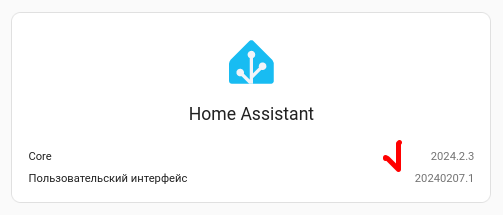
bump to 2024.2.3
-
https://www.debian.org/News/2024/2024021002 https://www.debian.org/News/2024/20240210
-
Скрин снят с ZKUII, после обновления. Смотреть в режиме отладки, на что ругается и исправлять hass -c /opt/var/lib/homeassistant --debug --verbose Удалить всего python3-* и поставить снова: удалить НА с зависимостями (frontend, scapy, ...) opkg remove --autoremove --force-depends homeassistant удалить пакеты for p in $(opkg list-installed | grep python | cut -d' ' -f1); do opkg remove --autoremove --force-depends $p; done удалить каталог rm -rf /opt/lib/python3.11 поставить снова НА NB если есть пакеты, зависимые от python3-*, напр., deluge, fail2ban, ... , возможно потребуется переустановка (но ЭТО не точно ы-ы-ы ).