

Orbit
-
Постов
131 -
Зарегистрирован
-
Посещение
Тип контента
Профили
Форумы
Галерея
Загрузки
Блоги
События
Весь контент Orbit
-
селф отправил.
-
2026-09-28 15:54:44 Daemon.Info 192.168.77.1 Sep 28 15:54:42 Keenetic-1300 ppp-sstp: sstp: proxy: connection from 10.9.222.83:35006 2026-09-28 15:54:44 Daemon.Info 192.168.77.1 Sep 28 15:54:42 Keenetic-1300 ppp-sstp: ppp5:: connect: ppp5 <--> sstp(10.9.222.83:35006) 2026-09-28 15:54:44 User.Info 192.168.77.1 Sep 28 15:54:43 Keenetic-1300 ndm: Radius::Server: {1} MS-CHAPv2 auth. 2026-09-28 15:54:44 Auth.Notice 192.168.77.1 Sep 28 15:54:43 Keenetic-1300 ndm: Core::Security::Authenticator: user "admin" authenticated, realm "Keenetic Giga", tag "sstp". 2026-09-28 15:54:44 Daemon.Info 192.168.77.1 Sep 28 15:54:43 Keenetic-1300 ppp-sstp: ppp5:admin: admin: authentication succeeded 2026-09-28 15:54:44 Kernel.Info 192.168.77.1 Sep 28 15:54:43 Keenetic-1300 kernel: sstp0: renamed from ppp5 2026-09-28 15:54:45 User.Warning 192.168.77.1 Sep 28 15:54:43 Keenetic-1300 ndm: Core::Scgi::Auth::Handler: obsoleted unauthenticated loopback RCI access will be removed soon, consider switching to access tokens. 2026-09-28 15:54:45 User.Warning 192.168.77.1 Sep 28 15:54:43 Keenetic-1300 ndm: Vpn::EventSender: "SSTPSRVVPN": user "admin" connected from "10.9.222.83" with address "192.168.77.189". 2026-09-28 15:54:46 Kernel.Warning 192.168.77.1 Sep 28 15:54:44 Keenetic-1300 kernel: mtdoops_proc: page is busy 2026-09-28 15:54:47 Kernel.Info 192.168.77.1 Sep 28 15:54:45 Keenetic-1300 kernel: br1: port 1(eth2.2) received tcn bpdu 2026-09-28 15:54:47 Kernel.Info 192.168.77.1 Sep 28 15:54:45 Keenetic-1300 kernel: br1: topology change detected, propagating Часть лога с компа перед ребутом. Могу весь лог за день скинуть раза четыре пытался соединиться и роутер уходил в перезагрузку. Пока версию откатил.
-
Вечер добрый. До обновления стояла KN 1012 5.2А9, KN 1010 5.2A6. Клиент VPNClientPro (Android).
-
5.2 Alfa 7 Маршрутизация сетей через VPN. Так и не поправлена!
Orbit опубликовал вопрос в Тестирование Dev-сборок
-
У меня работает с такими настройками external 172.16.40.2, где 172.16.40.2 адрес удалённого узла wereguard через который осуществляется доступ в сеть.
-
этот к клиентам работает а этот к модему нет.




-
Доступ в веб-интерфейс USB-модема за VPN-клиентом L2TP/IPSec ?
Orbit опубликовал вопрос в Тестирование Dev-сборок
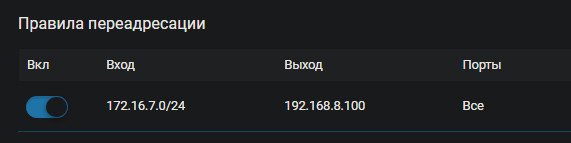
Добрый вечер. Пробовал настроить по аналогии с wireguard (с нем проблем нет в этом плане) С сервера 192.168.8.100 пингуется 192.168.8.1 нет. С клиентов сервера вообще глухо. Может что ещё добавить надо? сервер kn-1010 5.0 Alpha 1 клиент kennetic II 2.16.D.12.0-11 https://help.keenetic.com/hc/ru/articles/4403101043218-Доступ-в-веб-интерфейс-USB-модема-за-VPN-клиентом-Wireguard-туннеля -
Может этот вариант прокатит на 2.16.D.12.0-11 ? ping-check profile WG host 172.16.21.1 update-interval 30 mode icmp max-fails 5 timeout 5 ! interface Wireguard2 description Client security-level public ip address 172.16.21.2 255.255.255.0 ip mtu 1324 ip access-group _WEBADMIN_Wireguard2 in ip tcp adjust-mss pmtu ping-check profile WG ping-check restart wireguard peer публичный_ключ_сервера !server endpoint *.keenetic.link:54321 keepalive-interval 24 allow-ips 172.16.21.1 255.255.255.255 allow-ips удаленная_подсеть_на_сервере 255.255.255.0 connect ! up !
-
Интересно почему он пытается соединиться по внутреннему ip сервера. [I] Jun 4 05:07:02 kernel: wireguard: Wireguard0: handshake for peer "MNsbzSf5izIss9U18MjBJhcalPdXECom6FFQx4Sv2Gc=" (4) (172.16.88.2:55511) did not complete after 20 attempts, giving up [I] Jun 4 05:07:31 kernel: wireguard: Wireguard0: handshake for peer "MNsbzSf5izIss9U18MjBJhcalPdXECom6FFQx4Sv2Gc=" (4) (172.16.88.2:55511) did not complete after 5 seconds, retrying (try 2) [I] Jun 4 05:07:37 kernel: wireguard: Wireguard0: handshake for peer "MNsbzSf5izIss9U18MjBJhcalPdXECom6FFQx4Sv2Gc=" (4) (172.16.88.2:55511) did not complete after 5 seconds, retrying (try 3) [I] Jun 4 05:07:42 kernel: wireguard: Wireguard0: handshake for peer "MNsbzSf5izIss9U18MjBJhcalPdXECom6FFQx4Sv2Gc=" (4) (172.16.88.2:55511) did not complete after 5 seconds, retrying (try 4) [I] Jun 4 05:07:47 kernel: wireguard: Wireguard0: handshake for peer "MNsbzSf5izIss9U18MjBJhcalPdXECom6FFQx4Sv2Gc=" (4) (172.16.88.2:55511) did not complete after 5 seconds, retrying (try 5) [I] Jun 4 05:07:52 kernel: wireguard: Wireguard0: handshake for peer "MNsbzSf5izIss9U18MjBJhcalPdXECom6FFQx4Sv2Gc=" (4) (172.16.88.2:55511) did not complete after 5 seconds, retrying (try 6) [I] Jun 4 05:07:57 kernel: wireguard: Wireguard0: handshake for peer "MNsbzSf5izIss9U18MjBJhcalPdXECom6FFQx4Sv2Gc=" (4) (172.16.88.2:55511) did not complete after 5 seconds, retrying (try 7) [I] Jun 4 05:08:03 kernel: wireguard: Wireguard0: handshake for peer "MNsbzSf5izIss9U18MjBJhcalPdXECom6FFQx4Sv2Gc=" (4) (172.16.88.2:55511) did not complete after 5 seconds, retrying (try 8) [I] Jun 4 05:08:08 kernel: wireguard: Wireguard0: handshake for peer "MNsbzSf5izIss9U18MjBJhcalPdXECom6FFQx4Sv2Gc=" (4) (172.16.88.2:55511) did not complete after 5 seconds, retrying (try 9) [I] Jun 4 05:08:13 kernel: wireguard: Wireguard0: handshake for peer "MNsbzSf5izIss9U18MjBJhcalPdXECom6FFQx4Sv2Gc=" (4) (172.16.88.2:55511) did not complete after 5 seconds, retrying (try 10) [I] Jun 4 05:08:18 kernel: wireguard: Wireguard0: handshake for peer "MNsbzSf5izIss9U18MjBJhcalPdXECom6FFQx4Sv2Gc=" (4) (172.16.88.2:55511) did not complete after 5 seconds, retrying (try 11) [I] Jun 4 05:08:24 kernel: wireguard: Wireguard0: handshake for peer "MNsbzSf5izIss9U18MjBJhcalPdXECom6FFQx4Sv2Gc=" (4) (172.16.88.2:55511) did not complete after 5 seconds, retrying (try 12) [I] Jun 4 05:08:29 kernel: wireguard: Wireguard0: handshake for peer "MNsbzSf5izIss9U18MjBJhcalPdXECom6FFQx4Sv2Gc=" (4) (172.16.88.2:55511) did not complete after 5 seconds, retrying (try 13) [I] Jun 4 05:08:34 kernel: wireguard: Wireguard0: handshake for peer "MNsbzSf5izIss9U18MjBJhcalPdXECom6FFQx4Sv2Gc=" (4) (172.16.88.2:55511) did not complete after 5 seconds, retrying (try 14) [I] Jun 4 05:08:39 kernel: wireguard: Wireguard0: handshake for peer "MNsbzSf5izIss9U18MjBJhcalPdXECom6FFQx4Sv2Gc=" (4) (172.16.88.2:55511) did not complete after 5 seconds, retrying (try 15) [I] Jun 4 05:08:45 kernel: wireguard: Wireguard0: handshake for peer "MNsbzSf5izIss9U18MjBJhcalPdXECom6FFQx4Sv2Gc=" (4) (172.16.88.2:55511) did not complete after 5 seconds, retrying (try 16) [I] Jun 4 05:08:50 kernel: wireguard: Wireguard0: handshake for peer "MNsbzSf5izIss9U18MjBJhcalPdXECom6FFQx4Sv2Gc=" (4) (172.16.88.2:55511) did not complete after 5 seconds, retrying (try 17) [I] Jun 4 05:08:55 kernel: wireguard: Wireguard0: handshake for peer "MNsbzSf5izIss9U18MjBJhcalPdXECom6FFQx4Sv2Gc=" (4) (172.16.88.2:55511) did not complete after 5 seconds, retrying (try 18) [I] Jun 4 05:09:00 kernel: wireguard: Wireguard0: handshake for peer "MNsbzSf5izIss9U18MjBJhcalPdXECom6FFQx4Sv2Gc=" (4) (172.16.88.2:55511) did not complete after 5 seconds, retrying (try 19) [I] Jun 4 05:09:05 kernel: wireguard: Wireguard0: handshake for peer "MNsbzSf5izIss9U18MjBJhcalPdXECom6FFQx4Sv2Gc=" (4) (172.16.88.2:55511) did not complete after 5 seconds, retrying (try 20) [I] Jun 4 05:09:11 kernel: wireguard: Wireguard0: handshake for peer "MNsbzSf5izIss9U18MjBJhcalPdXECom6FFQx4Sv2Gc=" (4) (172.16.88.2:55511) did not complete after 20 attempts, giving up
-
Тут была тема не могу поиском найти (может канула к лету тк про обход ...) выкладывал человек скрипт. Может его как то подправить. #!/bin/sh PATH=/opt/sbin:/opt/bin:/opt/usr/bin:/usr/local/sbin:/usr/local/ fey="0 2 3" gate0=172.16.0.1 gate2=191.225.216.1 gate3=10.8.0.1 gnip() { ! ping -I nwg$1 -s0 -qc1 -W1 $2 >/dev/null 2>&1 } for i in $fey; do ip a s nwg$i | grep -q UP || continue gate=$(eval echo \$gate$i) if gnip $i $gate && gnip $i $gate && gnip $i $gate && gnip $i $ rem=$(echo $(ndmc -c "show interface Wireguard$i" | sed -n 's/ port=$(awk 'BEGIN{srand();print int(rand()*63000)+2000}') while netstat -nlu | grep -qw $port; do port=$(awk 'BEGIN{srand();print int(rand()*63000)+2000}') done nping --udp --count 9 --source-port $port --data-length 64 --d ndmc -c "interface Wireguard$i wireguard listen-port $port" >/ fi done >/dev/null 2>&1
-
Может кто для opkg скрипт подкинет? Устройство удалённо экспериментировать не вариант.
-
Кстати у них похоже у всех эта беда. Версия ОС4.2.6.3 МодельGiga (KN-1010) EAEU
-
Keenetic II
-
-
вот это оно!
-
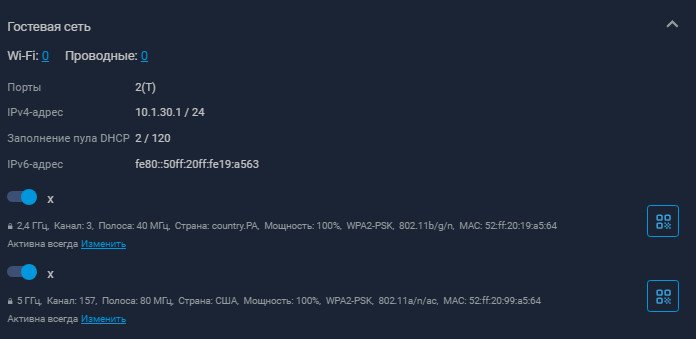
Не совсем то. У вас подключение клиента происходит к гостевой сети, здесь же подключения нет тк ip-адрес не выделяется.
-
GigaIII в mesh-системе не выдаёт ip в гостевой сети.
Orbit опубликовал вопрос в Тестирование Dev-сборок
KN1010 - GIGAIII версии везде 3.1.0. На контроллере такой проблемы нет.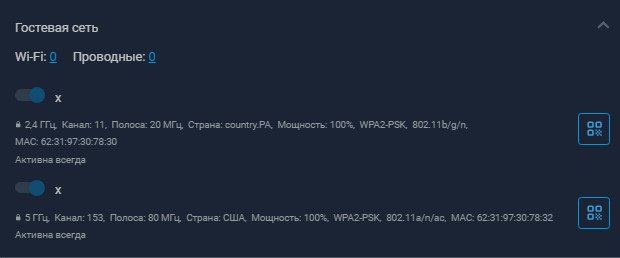
-
После исправления IPsec: исправлено добавление маршрута к клиентской сети на L2TP/IPsec-сервере [NDM-3758] маршрут добавляется, с сервера и клиент и его локалка пингуются но с локалки сервера нет пинга не клиента не его сети. В фаервол клиента разрешения добавил. Опцию "NAT для клиентов" выключал.
-
Тот же вопрос. При указании шлюза WG в external 3proxy его игнорирует, а команду route он вообще не знает.
-
4.3 Beta 3 не поправлено.
-
Первое сообщение повнимательней прочтите!
-
Так нет его там! И сервер как интерфейс в конфиге не значится.
-
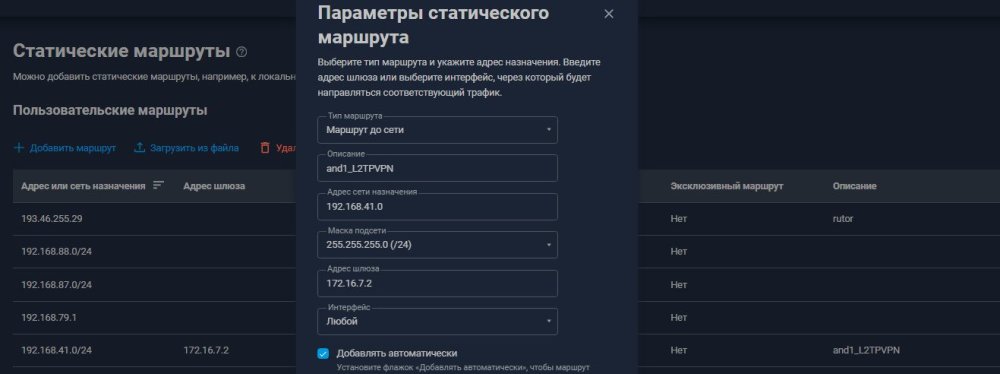
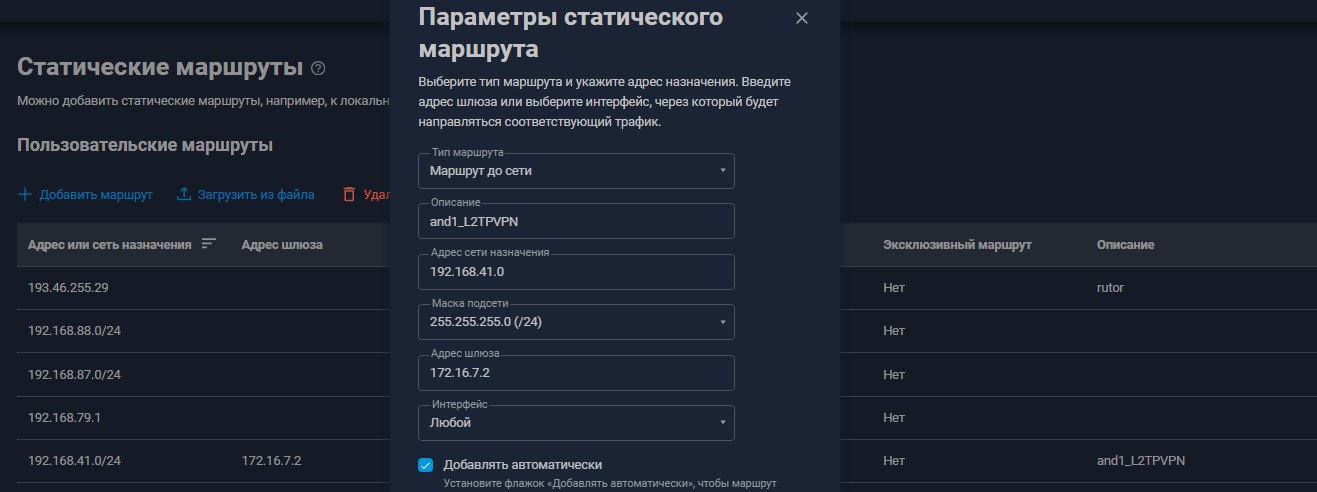
ip route 192.168.41.0 255.255.255.0 192.168.7.201 L2TPVPN auto !and1_L2TPVPN { "prompt": "(config)", "status": [ { "status": "error", "code": "7405600", "ident": "Command::Base", "message": "no such command: L2TPVPN." } ] }
-
Менял диапазон, без разницы. { "id": "PPPoE0", "index": 0, "interface-name": "PPPoE0", "type": "PPPoE", "description": "rostelecom", "traits": [ "Ip", "Ip6", "Supplicant", "Peer", "Ppp", "Pppoe" ], "link": "up", "connected": "yes", "state": "up", "role": [ "inet" ], "mtu": 1492, "tx-queue-length": 1000, "address": "5.138.248.210", "mask": "255.255.255.255", "global": true, "defaultgw": true, "priority": 63486, "security-level": "public", "ipv6": { "defaultgw": false }, "auth-type": "none", "uptime": 36311, "remote": "100.106.0.1", "fail": "no", "via": "GigabitEthernet1", "last-change": "36311.156623", "session-id": 5975, "ac-mac": "f8:13:08:32:20:7b", "summary": { "layer": { "conf": "running", "link": "running", "ipv4": "running", "ipv6": "disabled", "ctrl": "running" } }, "prompt": "(config)" } { "id": "GigabitEthernet1", "index": 1, "interface-name": "ISP", "type": "GigabitEthernet", "description": "rostelecom", "traits": [ "Mac", "Ethernet", "Ip", "Ip6", "Supplicant", "EthernetIp", "MtkSfpEthernet" ], "link": "up", "connected": "yes", "state": "up", "mtu": 1500, "tx-queue-length": 2000, "global": false, "security-level": "public", "usedby": [ "PPPoE0" ], "ipv6": { "addresses": [ { "address": "fe80::52ff:20ff:fe19:a565", "prefix-length": 64, "proto": "KERNEL", "valid-lifetime": "infinite" } ] }, "mac": "50:ff:20:19:a5:65", "auth-type": "none", "port": { "id": "GigabitEthernet1/0", "index": 0, "interface-name": "0", "label": "0", "type": "Port", "traits": [ "EthernetPort", "MtkSfpEthernetPort" ], "link": "up", "speed": "100", "duplex": "full", "auto-negotiation": "on", "flow-control": "off", "eee": "off", "cable-diagnostics": false, "transceiver": "internal", "sfp-combo": true }, "summary": { "layer": { "conf": "running", "link": "running", "ipv4": "disabled", "ipv6": "disabled", "ctrl": "running" } }, "prompt": "(config)" }
-
Да это и понятно. Думал может в cli надо что добавить.